
Home › Modules › Vulnerability Scanning

Vulnerability Scanning
Uplivra matches the software version on each network device against published CVEs every week, flags the ones CISA says are being exploited, and routes each finding to the group that owns the device.
Choose Vulnerability Scanning if you want to…
Match your network gear against known vulnerabilities (CVEs) every week.
- What to count
- The devices you want scanned and actionable. Counts show for every device; details and actions only for covered ones.
- Example
- Scan the 40 firewalls, routers and switches out of 300 devices: Vulnerability Scanning for 40, $200 a month.
Which of our devices does this CVE hit?
A new advisory lands and the first question is always the same. Uplivra already knows what's running on every device it monitors, so it answers that question for you, every week, without an agent or a credentialed scan.
How it works
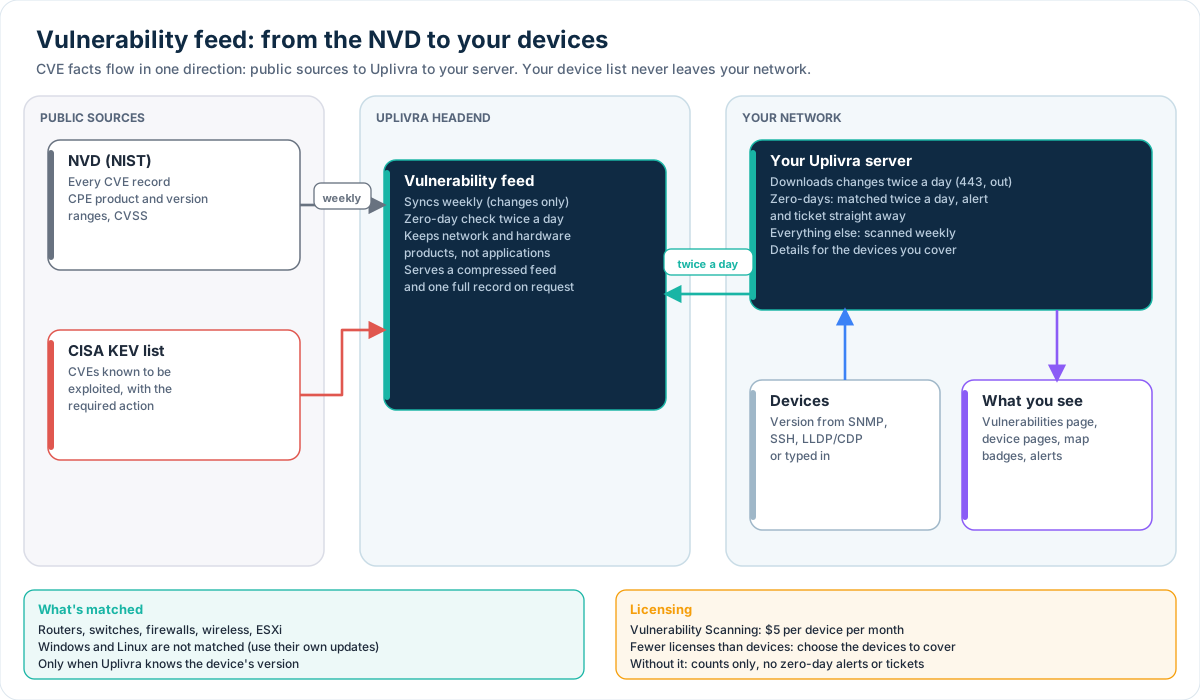
- One feed, kept small. Uplivra's headend pulls CVE records from the NVD and CISA's Known Exploited Vulnerabilities list every week. It keeps only what matching needs: a short summary, severity, and which products and versions are affected.
- Your server downloads changes twice a day. Nothing about your network is sent. The feed comes down; your device list stays put.
- Weekly matching against real versions. Uplivra compares the OS and version each device reports (SNMP, SSH, LLDP/CDP, or what you typed in) with the affected ranges. Cisco IOS, IOS-XE, NX-OS, ASA, Junos, FortiOS, PAN-OS, ArubaOS, RouterOS, SonicOS, pfSense, OPNsense, EdgeOS, FastIron, EXOS and ESXi are covered.
- Zero-days, twice a day. Uplivra checks for zero-days twice a day: vulnerabilities CISA says attackers are exploiting now, and new critical ones with no fixed version yet. When CISA lists one before the NVD has published versions, every device running that product is flagged until it does. Each zero-day on your devices raises a high-priority alert and opens a ticket straight away (in ServiceNow, Jira, Freshservice or Zendesk, or the Uplivra Service Desk), even if tickets for other alerts are off.
- Exploited first. Findings are sorted by CISA's known-exploited list, then severity. New exploited or critical findings raise an alert, which your ticketing and notification rules pick up.
Easy to act on
The Vulnerabilities page filters by device type, vendor, ownership group, severity, IP address and DNS name, or flips to a view by CVE. Each CVE links straight to the NVD and CVE.org, and one click fetches the full record (references, CVSS vector, weakness and the vendor's advisory).
From a CVE you can accept the risk (with a reason), mark it a false positive, raise an alert, open a help desk ticket, or plan the upgrade with Upgrade & Lifecycle. With Uplivra Intelligence, the AI model on your own network suggests a workaround or the version to move to.
Ownership groups
Every device lands in a group (Security, Network, Wireless, Windows systems, Linux and Unix, and more) by its type and vendor, using what SNMP and LLDP/CDP tell Uplivra. Edit the groups, add your own, and match on keywords or regular expressions. Filter findings by group so each team sees its own list.
See it before you buy it
Without the module you still see how many possible vulnerabilities a device has (zero-day alerts and tickets come with the module): on the device page, the network map, the discovery page and the Vulnerabilities page. Which CVEs, and the actions, come with the license.
Pricing
$5 per device per month. License fewer devices than you monitor and you choose which ones are covered; counts still show for the rest.
This product uses data from the NVD API but is not endorsed or certified by the NVD. Read the guide.
Other modules

Core monitoring
Availability, services, SNMP and websites, with alerts people act on
$2.00 → $1.00 per device per month, graduated. Free for up to 15 devices; from the 16th, every device is billed. $25 a month minimum; 15% off when paid yearly
Network Pro
Ports, network map and traffic flows on every device
+$2 per device per month
Log Intelligence
Collect, search and keep every log, encrypted and tamper-evident
$299–$1,799 per year by monthly volume (price and plan sizes under review)
Upgrade & Lifecycle
Firmware, end-of-life dates and upgrades with proof they worked
$2 per device per month
Compliance & Evidence
Controls tested every day, evidence ready for the audit
$5 per device per month
Packet Capture
Record all the time, pull the moment it went wrong
$499 per capture collector per year: 1 SPAN port, up to 1 Gbps
ITSM Integration
Changes, approvals and incidents in the ticketing system you already use
$1 per device per month (price under review)
Native Service Desk
A help desk linked to your devices and alerts
$5 per help desk agent per month
Uplivra Intelligence
Ask your network what's wrong, in plain words
$1,599 per year, one flat rate for any number of devices (free for the first 6 months on new installations) (price under review)
Automation & Remediation
Runbooks for the routine fixes, with approval when you want it
$1 per device per month (price under review)
MSP multi-tenant
Every customer in one console, and a router to reach them
$49 per month plus $5 per customer (price under review)
PCI CDE Monitoring
Monitoring built for the cardholder data environment
$4 per card-environment system per month, $49 minimum (price under review)
Cloud Monitoring
AWS, Azure and Microsoft 365, next to everything else
$2 per cloud resource per month (also counts as a Core device); extra providers $1,000 one-time setup each
Cloud Cost Watch
Month-to-date spend, forecast and budget alerts
$0.50 per cloud resource per month (price under review)