

Home › Install guides › Finding anything with the search box
Install guide · EveryoneFinding anything with the search box
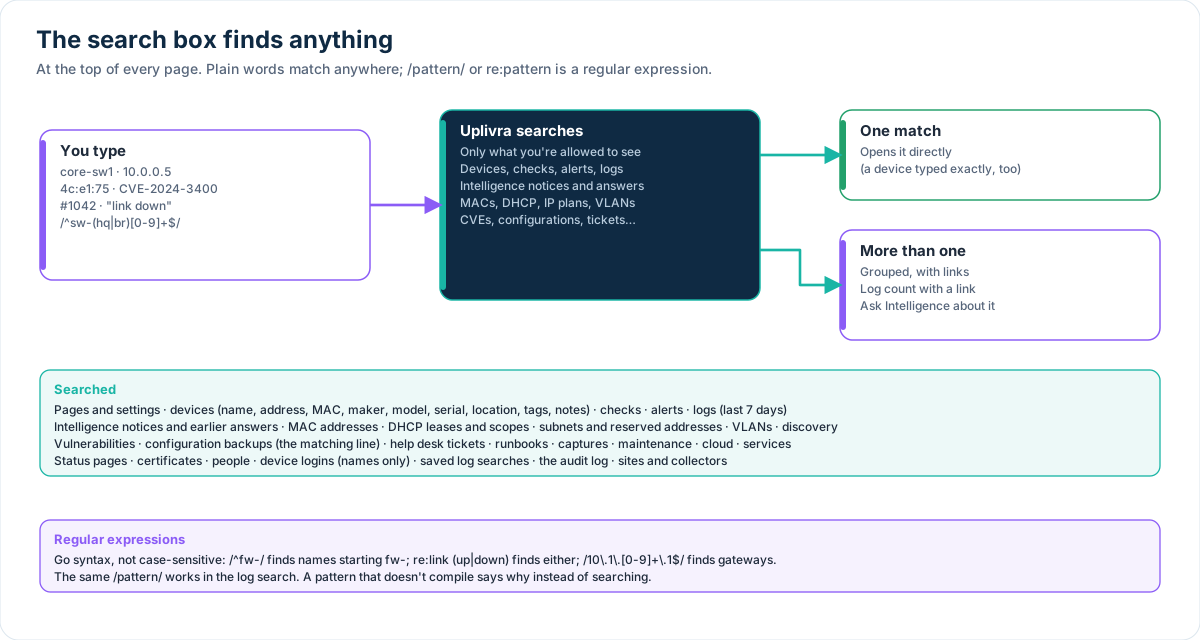
Type a name, address, MAC, CVE, ticket number, words from a log, or a regular expression. One match opens directly; more are grouped with links, a log count and an "Ask Intelligence" button.
Uplivra Technologies LLC · Guide for Uplivra 26.10 · Updated 28 September 2026 · Latest version: https://uplivra.com/guides/search.html
How it works
The box at the top of every page searches everything you're allowed to see. You only get results from the parts of Uplivra your access profile includes.
- One match opens directly. So does a device whose name, address or MAC address you type exactly.
- More than one shows them grouped (devices first), each with a link. Open the page takes you to the full list.
- Logs are counted for the last 7 days, with a button that runs the same search in the log search.
- Ask Uplivra Intelligence starts a question with what you typed (with the Intelligence module).
- To see every match instead of jumping to the only one, search again from the search page.
What it searches
| Area | What's matched |
|---|---|
| Pages | Every page and setting by name, and common words for it ("smtp" finds Email servers) |
| Devices | Name, address, MAC and maker, vendor, model, serial number, role, location, owner, tags, notes, site |
| Checks | Check type, its last message and its settings |
| Alerts | Title and message |
| Logs | Words, as the log search reads them (last 7 days) |
| Uplivra Intelligence | Notices (title, detail, evidence) from the last 90 days, and earlier questions and answers |
| Network | MAC addresses and makers, DHCP leases and scopes, subnets (an address finds its subnet), reserved addresses, VLANs, discovered hosts |
| Security | Vulnerabilities (CVE ID, summary, product) and the matching line of each device's latest configuration backup |
| Work | Help desk tickets (#1042 or words), runbooks, captures, maintenance windows, services, status pages |
| Administration | Sites and collectors, cloud accounts and resources, certificates, people, device login names (never passwords), saved log searches, the audit log |
Regular expressions
Put the pattern between slashes, or start with re:. Matching ignores upper and lower case.
| You type | Finds |
|---|---|
/^sw-(hq|br)[0-9]+$/ | Names such as sw-hq1 and sw-br12, not sw-hq-old |
re:link (up|down) | Anything saying "link up" or "link down", including log messages |
/10\.1\.[0-9]+\.1$/ | Addresses ending in .1 in 10.1.x.x |
/^4c:e1:75/ | MAC addresses from one maker's range |
The syntax is Go's (RE2): no look-arounds or back-references, and it can't run away on large data. The same /pattern/ works in Logs. A pattern that doesn't compile says why instead of searching.