

Home › Install guides › The data API for dashboards and other software
Install guide · IT teams, MSPs and developersThe data API for dashboards and other software
Read-only tokens that let dashboards, PSA tools and scripts read device status, metrics, availability and alerts, and nothing else.
Uplivra Technologies LLC · Guide for Uplivra 26.10 · Updated 28 September 2026 · Latest version: https://uplivra.com/guides/data-api.html
What you need
- Uplivra 26.10.26 or later.
- The Create data API tokens permission (administrators have it).
What it can and can't read
The data API only reads. It never returns logs, device configurations, passwords or logins, packet captures, the audit log, vulnerability details or Intelligence's analysis. For everything else (changing things, the audit log) use the Uplivra API.
| Scope | What it reads |
|---|---|
| Status | Sites, devices and whether each is up, down or warning |
| Metrics | Metric values and their history (CPU, traffic, latency…) |
| Availability | Uptime percentages |
| Alerts | Open and recent alerts (not vulnerability alerts) |
Make a token
- Open Settings › Data API and fill in Make a token: - a name (what uses it, such as "Power BI dashboard"); - the scopes it may read; - optional: only some sites; - optional: include device IP addresses (off by default: most dashboards only need names); - requests a minute (60 by default) and when it expires; - optional: the addresses the other software connects from.
- Click Make token and copy it. It's shown once; it starts with
uv_data_. - Revoke stops it working at once.
Ports
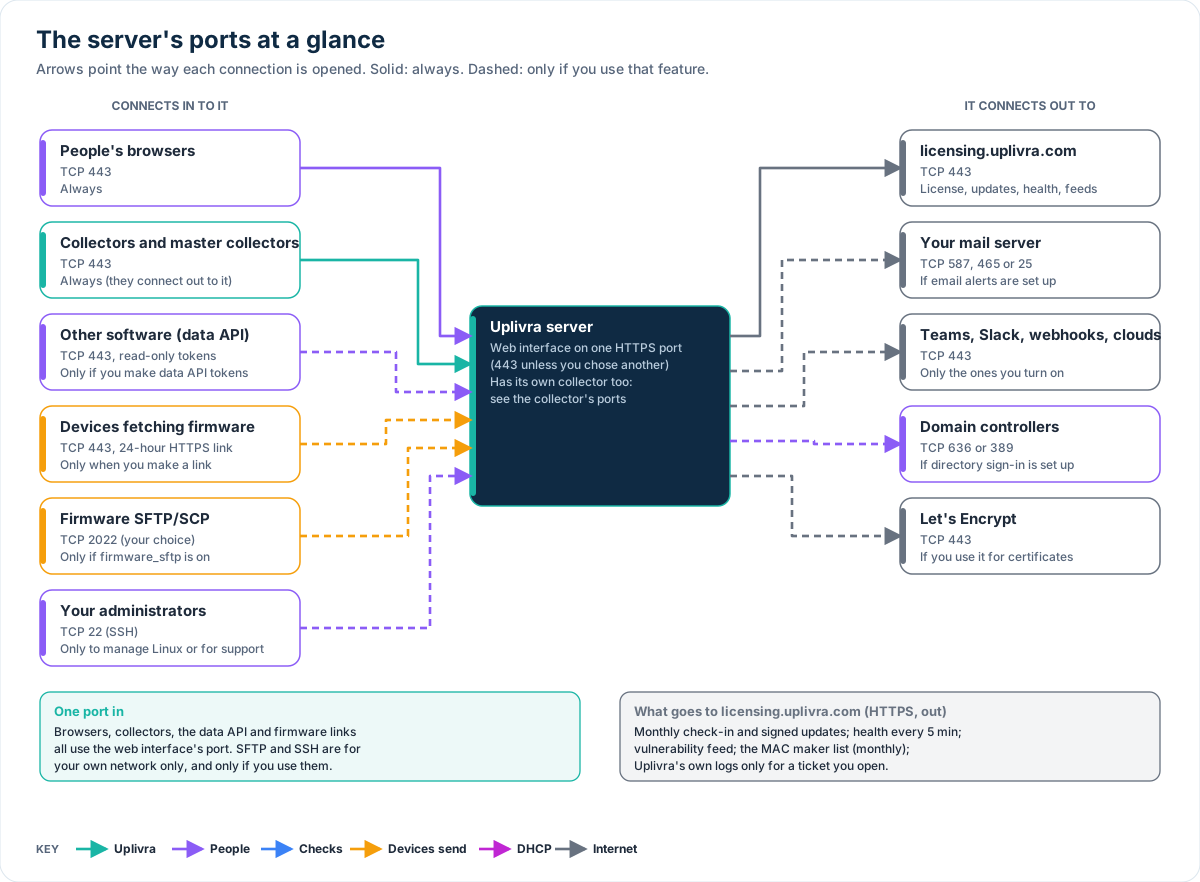
No new ports: the data API answers on the web interface's port (443 unless you chose another). The other software connects in to the server there. Limit who can with Only from these addresses on the token, and your own firewall. See the server's ports in Ports and firewall rules.
Use it
curl -H "Authorization: Bearer uv_data_…" https://uplivra.example.com/api/data/v1/summaryThe description is at /api/data/v1/openapi.json (OpenAPI 3.1). Paths: summary, sites, devices, devices/{id}, metrics, metrics/{id}/history, availability and alerts. Filter devices with ?site= and ?status=.
A token over its rate gets 429 with Retry-After. A token without the scope gets 403.
Uplivra supports the API itself; what you do with the data in the other software is up to you.