

Home › Install guides › Site servers and collector homing
Install guide · IT teams, MSPs and firewall teamsSite servers and collector homing
A site server is a collector the other collectors at its site report through, so it's the only computer there talking to Uplivra. Collectors check in with every site server each minute, report directly when none answers, and go back as soon as one does.
Uplivra Technologies LLC · Guide for Uplivra 26.10 · Updated 28 September 2026 · Latest version: https://uplivra.com/guides/site-servers.html
What it does
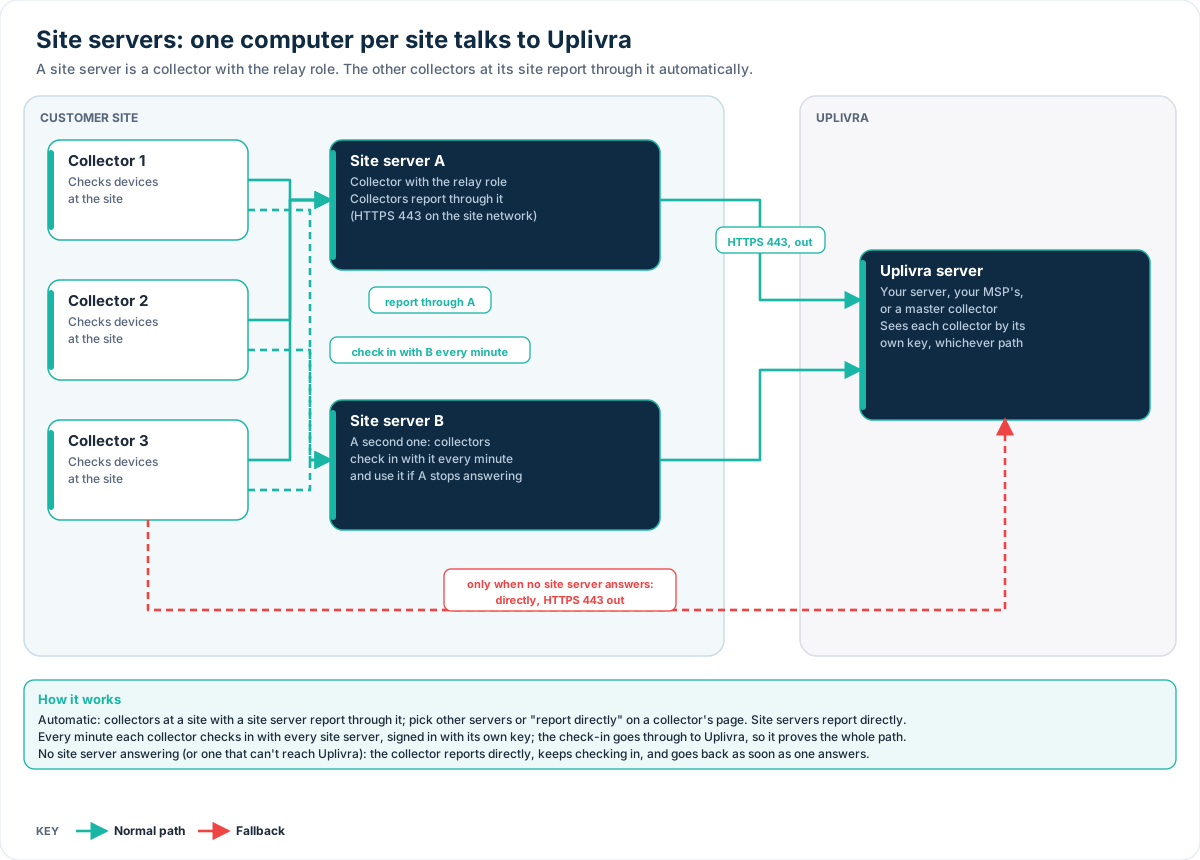
- A site server is a collector with the relay role at a customer site. Uplivra sends the site's other collectors its address and certificate fingerprint, and they report through it. Only the site server connects to Uplivra.
- Every minute, each collector checks in with every site server it has, signed in with its own key. The check-in passes through the site server to Uplivra, so an answer proves the whole path works.
- Work goes through the first site server that answers. With two, a collector moves to the second when the first stops answering.
- If no site server answers, or one says it can't reach Uplivra itself, the collector reports to Uplivra directly (as it's set up to), keeps checking in every minute, and goes back as soon as a site server answers or you point it at a different one.
- Nothing is lost while it switches: checks keep running, results wait and are sent on the next path.
You need Uplivra 26.10.28 or later on the server and the collectors.
Step 1: Make a site server
New computer. Run the installer and choose Site server. Connect it to your Uplivra server (or your MSP's master collector) with a setup code for the same site as the collectors. The installer opens HTTPS 443 for the other collectors; the management page can share the port.
An existing collector can become one: an MSP master collector is already one for its own site. For a collector at a customer site, run the installer again and choose Site server (settings are kept), or add "relay" to roles in collector.json and restart it.
On its page in Settings › Sites and collectors, the Home servers card says it's a site server, how many collectors reported through it in the last 5 minutes, and the address the others use. When they reach it by another address (a DNS name, NAT, a second interface), type it under Address other collectors use.
Step 2: Nothing (the collectors do it themselves)
Within a minute of the site server's first status report, the site's other collectors are told about it. Their Home servers card shows each site server, whether it answered its last check-in, how fast, and which one they report through.
To choose differently for one collector, open its page and pick:
| Choice | What it does |
|---|---|
| Automatic (default) | The site servers at the collector's own site, lowest failover priority first |
| These site servers | The ones you tick, from any site, in that order. Useful for a branch with no server of its own |
| Report to Uplivra directly | No site server |
Every change is in the audit log. A home server can also be set on the collector itself in collector.json (home_servers, with url and fingerprint); that wins over the web interface.
Firewall rules
| From | To | Port | Why |
|---|---|---|---|
| Each collector | Site server | TCP 443 (its relay port) | Reporting and check-ins |
| Site server | Uplivra server | TCP 443, out | Everything from the site |
| Each collector | Uplivra server | TCP 443, out | Only when no site server answers. Keep this rule, or collectors go quiet while the site server is down |
No new ports on the Uplivra server. See Ports and firewall rules.
Good to know
- Collectors pin the site server's certificate (sent by your Uplivra server over its own authenticated connection), so a look-alike can't pose as it.
- Each collector still signs in with its own key through the site server; Uplivra sees exactly who is talking.
- Site servers report directly, never through each other.
- Remote access sessions, packet capture pulls and firmware downloads go through the same path.
- The collector's management page and Administration › Diagnostics show its home servers and which one it uses.
Troubleshooting
| What you see | What to do |
|---|---|
| "Not answering" with "connection refused" or a timeout | Is the site server running, and can the collector reach it on 443? Check VLAN firewalls |
| "the home server can't reach the Uplivra server" | The site server's own connection is down; the collector reports directly meanwhile. Check the site server's page |
| No address shown for a site server | It hasn't reported its addresses yet, or has none Uplivra can use. Type the address on its page |
| A collector keeps reporting directly | Its choice is Report to Uplivra directly, or home_servers in its collector.json points elsewhere |