
Home › Install guides › Network interfaces, routes and setup again
Install guide · IT teams and MSPsNetwork interfaces, routes and setup again
Set addresses, VLAN ports and static routes on the Uplivra server and its collectors from the web interface. A change that cuts the server off rolls itself back.
Uplivra Technologies LLC · Guide for Uplivra 26.10 · Updated 28 September 2026 · Latest version: https://uplivra.com/guides/network-interfaces.html
What you need
- Uplivra 26.10.26 or later, on the virtual appliance or a Linux install made by Uplivra's setup (it writes the network settings Uplivra can change).
- The Change network interfaces, addresses and routes of the server and collectors permission (administrators have it).
- Windows collectors and hand-built Linux computers are changed in their own tools; Uplivra shows their interfaces but doesn't change them.
Change the server's network
- Open Settings › Network interfaces.
- For each port, choose DHCP or static, and for static give the address with its size (
10.0.0.5/24), the gateway (one port only) and DNS servers. - Optional: add a VLAN port: pick the physical port and the VLAN ID. It appears as, for example,
eth0.20. - Optional: add static routes: the network (
10.50.0.0/16) and the router to reach it through. - Tick which port is the management port. Once a change is confirmed, the web interface and the collectors' connection only answer on management ports.
- Click Save and apply.
If the management address changes, Uplivra lists what to update first: DNS records, and any collector that connects to the old address. Tick that you've read it, then save again.
Rollback
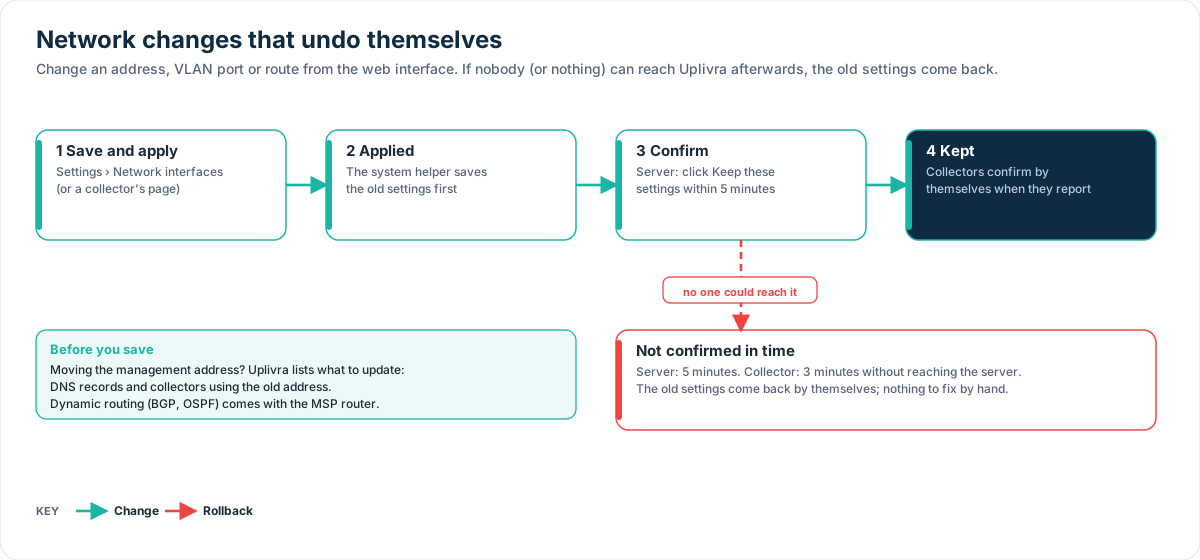
After applying, Uplivra waits for you to confirm. Open the web interface at the new address and click Keep these settings within 5 minutes (collectors confirm by themselves when they reach the server again). If nobody confirms, the previous settings come back on their own, so a typo can't lock you out.
Collectors
Open a collector's page (Settings › Sites and collectors, click its name), then Network interfaces. The page and the steps are the same. The collector confirms the change itself when it reaches the server again; if it can't within 3 minutes, it rolls back.
Ports
Changing interfaces needs no new ports. If you move the management address, or add a port for management, allow HTTPS (443, or your web port) to the new address in your firewalls before you save, and update collectors or DNS that point at the old one: Uplivra lists them. See Ports and firewall rules.
Dynamic routing
Static routes are available everywhere. Dynamic routing (BGP preferred, or OSPF) isn't available on the server or ordinary collectors. It comes with the MSP router (a collector in router mode, Network Pro), or as a custom collector build that Uplivra develops for you at an extra cost. Ask us.
A certificate per interface
Under Settings › Certificates, open a certificate and pick the interfaces it's for. A browser connecting to that interface's address gets that certificate; the others get the default one. This is useful when the management network uses your company CA and the collectors' network uses Let's Encrypt, for example.
Run setup again
Settings › Run setup again walks through the questions setup asked the first time (network, web port, certificate, time, email, where alerts go, sites and collectors, sign-in, support), one step at a time, with what's set now and a link to change it. It needs the Go through setup again permission.
On the appliance you can also run the console setup again at the next restart: type RUN SETUP to confirm, and tick Restart the appliance now if you want it straight away. Your data, sign-ins and collectors are kept. A collector appliance has the same button on its page.
Troubleshooting
| What you see | What to do |
|---|---|
| "Waiting for confirmation" and you can't reach the new address | Wait 5 minutes: the old settings come back. Check the address and gateway, then try again |
| The page says the computer's network isn't managed by Uplivra | It wasn't set up with Uplivra's setup, or it's Windows. Change it in the operating system |
| A collector went offline after a change | It rolls back after 3 minutes if it can't reach the server. If it doesn't come back, open its console |