

Home › Install guides › MAC addresses and makers
Install guide · IT teams and MSPsMAC addresses and makers
Uplivra lists every network adapter it can see, names its maker from the IEEE registry, links it to your devices, fills in missing vendors, and tells you when something new appears.
Uplivra Technologies LLC · Guide for Uplivra 26.10 · Updated 28 September 2026 · Latest version: https://uplivra.com/guides/mac-addresses.html
What you need
- Uplivra 26.10.27 or later.
- At least one of:
- an SNMP check on your routers or firewalls (their ARP tables) and switches (their MAC address tables);
- Uplivra's DHCP server (Network Pro);
- a discovery scan.
- Optional: Uplivra Intelligence for the New devices on the network message and questions about makers.
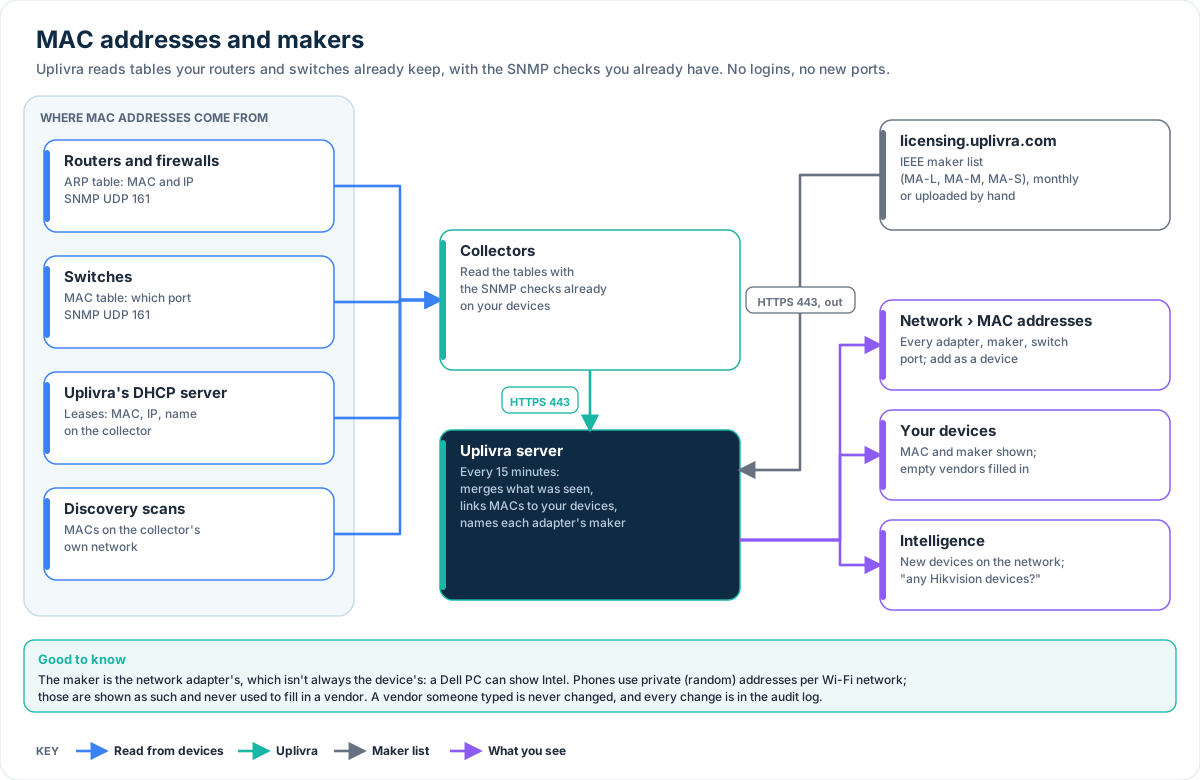
Where MAC addresses come from
Every 15 minutes the Uplivra server gathers what it knows:
| Source | What it gives |
|---|---|
| Routers' and firewalls' ARP tables (SNMP) | MAC and IP address of everything they talk to |
| Switches' MAC address tables (SNMP) | MAC and the switch port it's plugged into (ports with a handful of MACs; uplinks are ignored) |
| Uplivra's DHCP server | MAC, IP address and the name the device gave |
| Discovery scans | MAC of hosts on the collector's own network |
| The device itself (SNMP) | A monitored device's own adapters |
Nothing new is installed or logged into, and no new ports are needed: it uses SNMP (UDP 161, out from the collector) that your checks already use, your DHCP leases and your scans. The server downloads the maker list over the HTTPS connection it already makes to licensing.uplivra.com. Adapters not seen for 90 days are dropped from the list.
See them
Open Network › MAC addresses. You get:
- how many adapters were seen, how many aren't among your devices, how many use private addresses, and how many are new today;
- the makers, with counts. Click one to show only its adapters;
- the list: MAC, maker, addresses, name, where it was seen (for example core-switch Gi1/0/7), the device it belongs to, and first and last seen. Search it, or filter by maker, by whether it's in your devices, or by new;
- Add as a device next to anything that isn't monitored yet (the wizard opens with its address, name and maker filled in);
- Download CSV.
Each device's page shows its MAC address and adapter maker next to its address.
Vendors filled in for you
When a device has no vendor, Uplivra fills it in from its MAC address: from the device's own adapter (SNMP), or from the one MAC address seen at its IP address. A vendor someone typed is never changed. Discovered hosts that SNMP didn't identify get their maker too. Each change is in the audit log.
Turn this off under Network › MAC addresses › How it works.
The first half of a MAC address names the adapter's maker, which isn't always the device's: a Dell computer can have an Intel adapter. Phones, tablets and laptops often use a private (random) address for each Wi-Fi network, which no maker owns; they're shown as such and never used to fill in a vendor.
The maker list
Uplivra uses the IEEE registry (MA-L, MA-M and MA-S assignments). It's built into each release, and the server downloads the latest copy from Uplivra every month.
Optional, for a server without internet access: download oui.csv, mam.csv and oui36.csv from standards-oui.ieee.org on another computer, and upload them one at a time under Network › MAC addresses › No internet on this server?