
Home › Install guides › Health reporting and portal monitoring
Install guide · Customers, MSPs and IT teamsHealth reporting and portal monitoring
Every Uplivra server tells Uplivra how it's doing every 5 minutes, so problems are spotted early. You choose how much it shares. MSPs see their own customers on the portal; Uplivra staff see everyone. Anything that touches your systems still needs your approval.
Uplivra Technologies LLC · Guide for Uplivra 26.10 · Updated 27 September 2026 · Latest version: https://uplivra.com/guides/health-monitoring.html
How it works
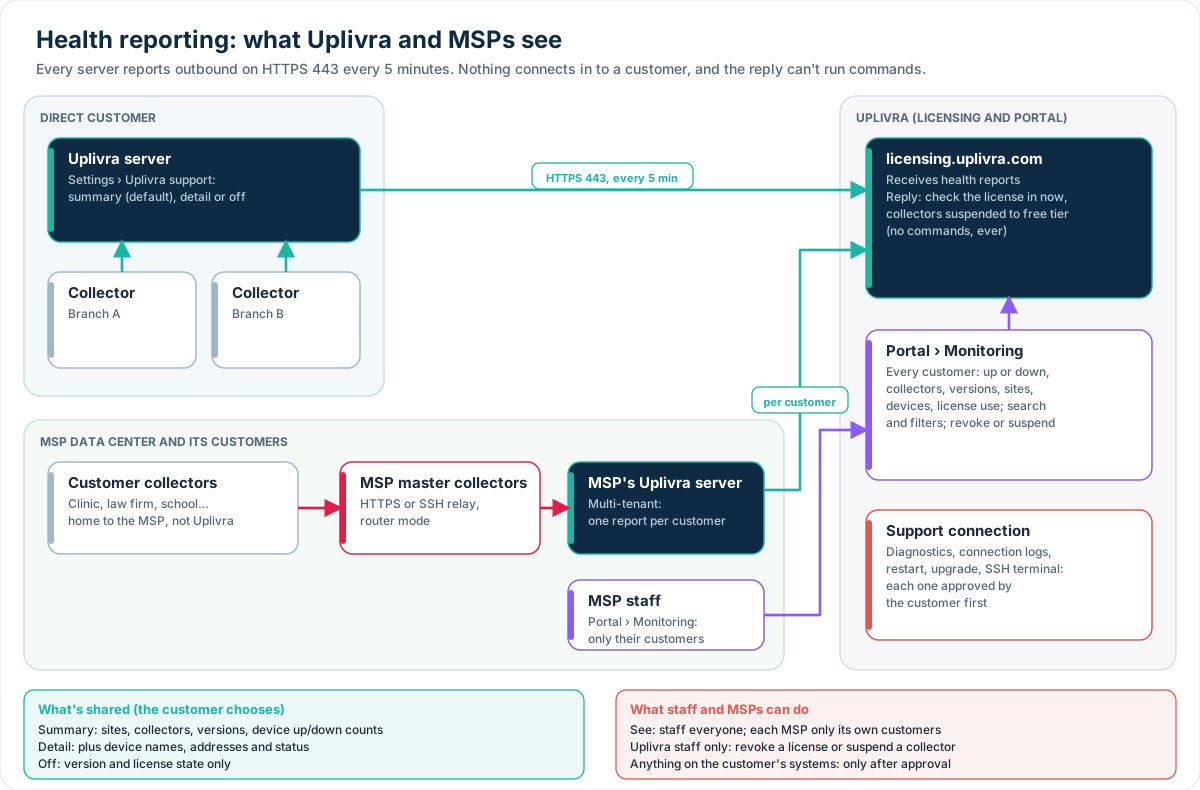
- Every Uplivra server with an online license key sends a health report every 5 minutes to
licensing.uplivra.com, the same place it checks its license. It connects out over HTTPS (port 443). Nothing connects in. - The portal's Monitoring page turns the reports into one view: each customer's status (up or down), collectors online, versions, sites, devices and license use, with search and filters.
- MSPs see the customers they bought licenses for or that Uplivra assigned to them, plus the companies on their own multi-tenant server. They never see other MSPs' customers. Their view is read only.
- The reply to a report can only do two things: tell the server to check its license in now (because it was revoked, restored or changed), and name collectors suspended to the free tier. It never runs commands or changes devices.
- Anything that touches your systems (diagnostics, the connection problems log, restarts, upgrades, SSH terminals) goes through the separate support connection, and runs only after one of your administrators approves each request.
What is shared
Choose under Settings › Uplivra support › Health reporting to Uplivra in your Uplivra. The page also shows what would be sent right now.
| Level | Sends | Doesn't send |
|---|---|---|
| Summary (default) | Version, license state and use, site names, collector names, versions, whether each is online, the devices each checks, and counts of devices up, down and with warnings | Device names, addresses, logs, flows, configurations, credentials |
| Summary and device detail | The summary, plus each device's name, address, site, collector and status | Logs, flows, configurations, credentials |
| Off | Only the version and license state, so license changes still reach the server | Everything else |
New servers ask during setup (the summary is suggested). Servers upgraded from earlier versions start on the summary; change it any time. For unattended installs, set "health_report": "summary", "detail" or "off" in the answers file or in /etc/uplivra/server.json; the choice on the settings page wins once someone saves it.
For MSPs
- Your customers' collectors connect to your master collectors in your data center (over HTTPS, SSH or through router mode), not to Uplivra. See MSP master collector and router.
- Your multi-tenant Uplivra server reports each of your customers separately, and your portal login shows them under Monitoring, next to customers who run their own server and bought through you.
- Uplivra staff can assign a direct customer to you (the customer's license is then "looked after" by your company), so it appears on your Monitoring page too.
- Each customer still decides what's shared with their own settings when they run their own server.
Revoking and suspending
Only Uplivra staff can do this, from the portal:
- Revoke a license: the whole installation drops to the free tier (15 devices, no paid modules) at its next report, within about 5 minutes. Nothing is deleted. Restoring the license, renewing the subscription or buying a new license brings everything back, again within about 5 minutes.
- Suspend a collector: that collector checks only the first 15 licensed devices at its site, and its traffic flows, packet capture recording and log forwarding stop. Routing (MSP router mode), time settings and updates are left alone so nothing drops off the network. The customer sees a banner on the collector's page and its management page, and an alert. Buying or updating the license lifts suspensions automatically; staff can also lift them.
If a server doesn't report (turned off, or it can't reach the licensing service), license changes reach it at its next monthly check-in instead.
Troubleshooting
- "Not reporting" on the portal: the server hasn't reported for 15 minutes. Check it's running and can reach
https://licensing.uplivra.com(through your proxy if you use one). The settings page shows the last error. - "No report": the server has never reported. It needs version 26.10.5 or later and an online license key (offline and free installations don't report).
- A collector shows offline: it hasn't contacted its server for 5 minutes. Ask the customer for a connection problems log through the support connection: it lists the collector's last contact, status and the connection errors from its own log.